Stay up to date with the latest technology trends and research from our ERP solution specialists.

WMS GO features for NetSuite warehouses, from goods-in to dispatch.
WMS GO is a NetSuite-native warehouse management app, built and supported by Catalyst ERP, a UK Oracle NetSuite partner. Your team scans every receipt, pick and move on a handheld, and NetSuite records it as it happens, with lot, expiry and operator attached. No second database, no re-keying.
7 groups, goods-in to dispatch
Unlimited floor users
£4,995 a year, fixed
How does WMS GO handle goods receiving in NetSuite?
- Purchase Order receiptsScan item, lot and quantity against the order.
- Transfer Order receiptsReceive stock moving between your own locations.
- Customer returnsReceive returned goods back into stock against the return.
- Bulk receiptReceive large deliveries without line-by-line keying.
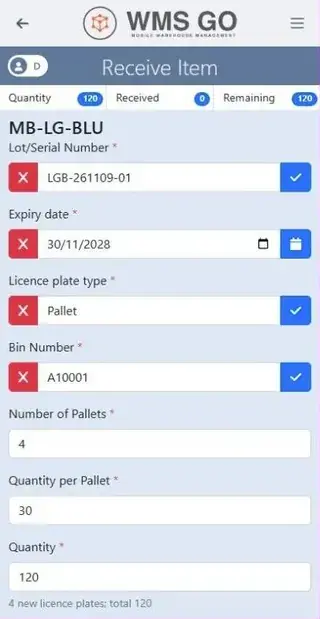
- Automatic lot numbersGenerated on receipt in your own format, with counters that reset daily, weekly, monthly or yearly.
- Bin occupancy on put-awaySee what is already in a bin before you fill it.
- One-scan GS1 and supplier barcodesItem, lot and expiry captured in a single scan.

Receiving a pallet: lot, expiry, licence plate and bin on one screen.
How does WMS GO control lots, expiry and stock status?
- Lot allocation rulesPer site, FEFO or FIFO, minimum shelf life, or one whole lot per line. First matching rule wins.
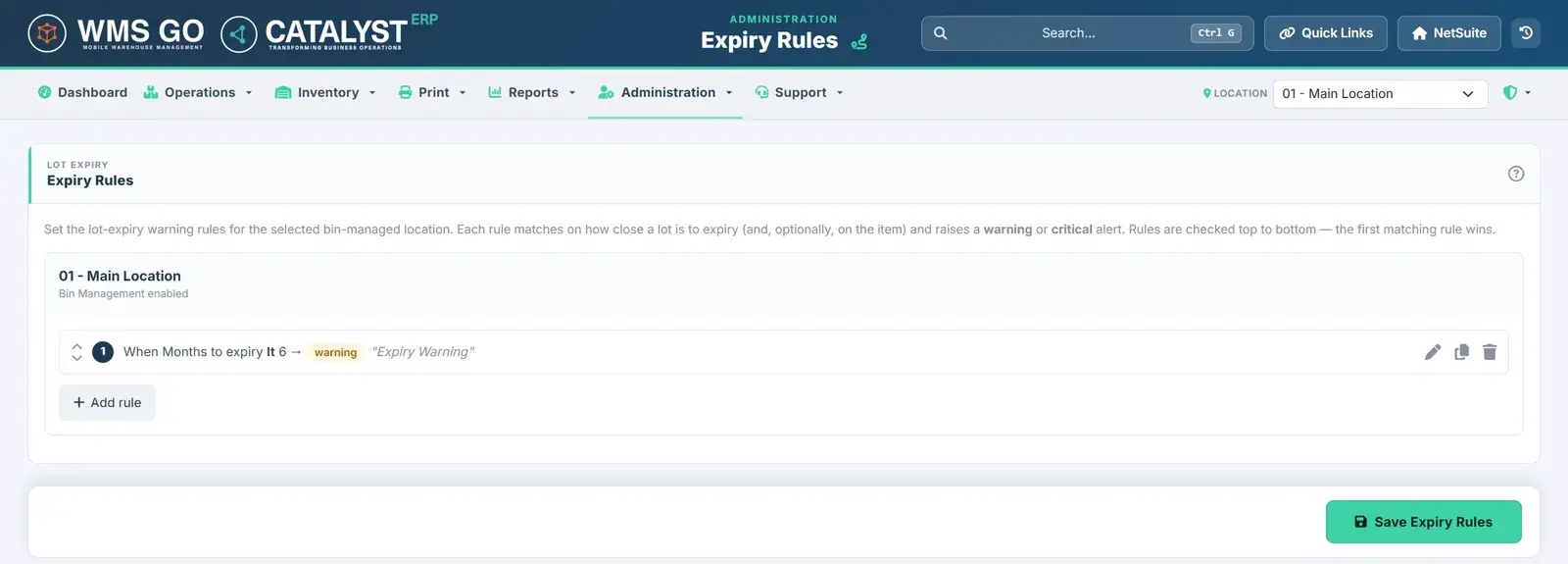
- Expiry rulesWarning and critical alerts by months to expiry, item, category or any item field.
- Inventory status and quarantineQuarantined or unavailable stock never reaches a pick list.
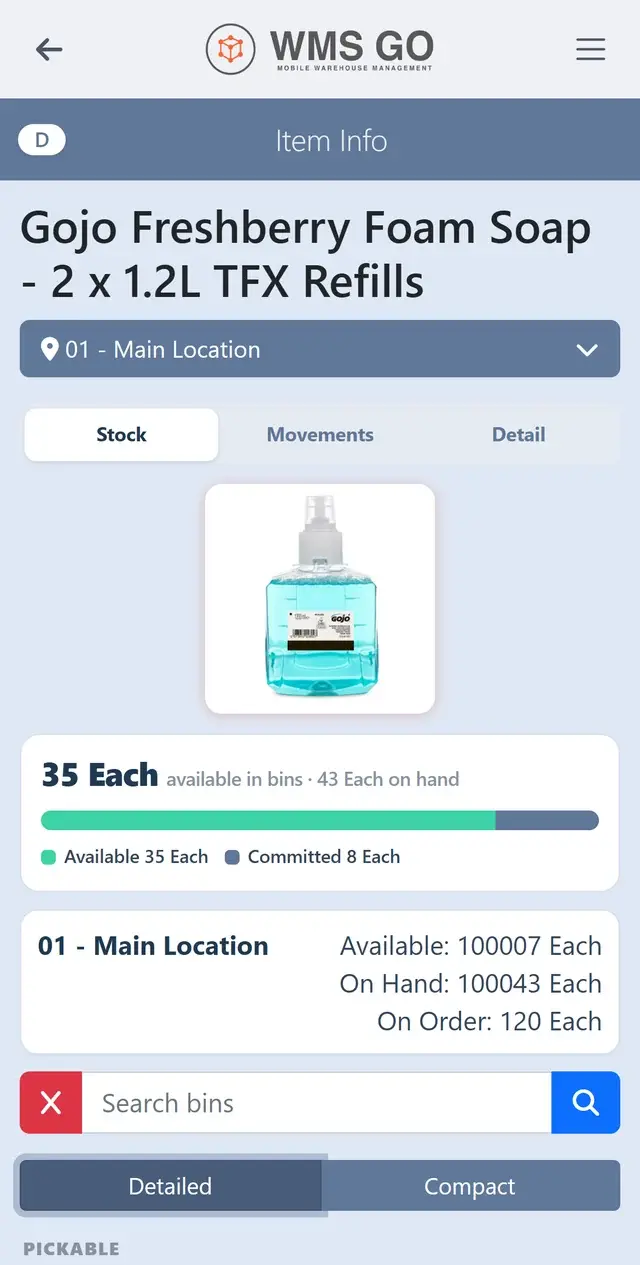
- Item InfoStock by bin and lot, open orders, recent movements and a photo, on the handheld.
- Item TraceFollow a lot or serial number through every move it has made.

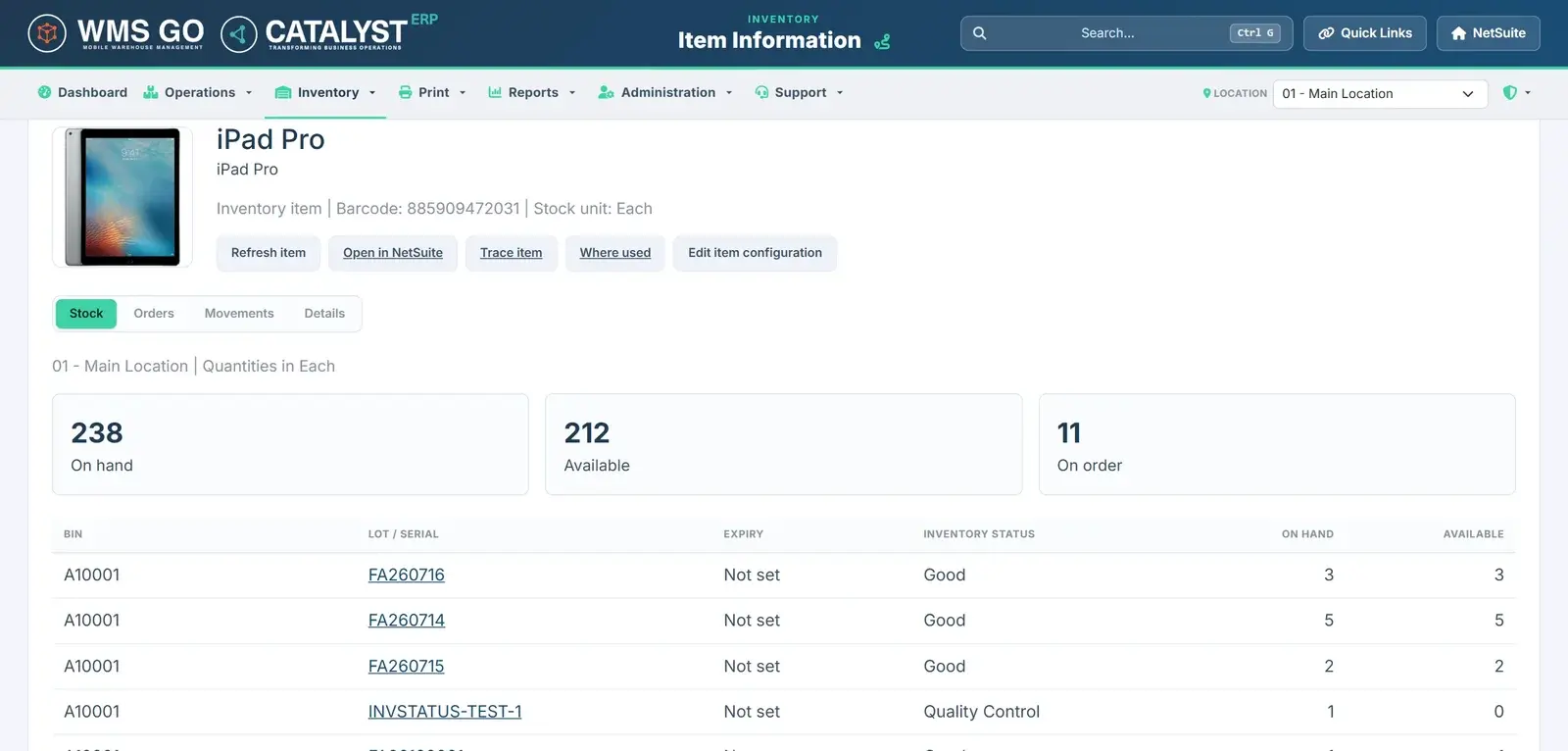
Item Info: available and committed stock, with on hand and on order by location.
How do expiry rules work in WMS GO?
Each location has its own expiry rules. A rule warns or blocks a lot by months to expiry, item or category, with your own message.
Rules are checked from top to bottom and the first matching rule wins. Pickers see the warning on the handheld before the lot leaves the shelf.
Tracking lots and expiry dates today?Book a demo and we will show you the WMS GO rules that match how you allocate stock now.
Which picking methods does WMS GO support?
- Wave automationWaves built and released by rule every 15 minutes, or built and edited by hand in the Manager Hub.
- Single-order pickingClaim an order and walk it in pick sequence, scanning bin, item and lot.
- Multi-order pickingSeveral orders in one walk, with lines pushed, pulled and handed between pickers.
- Zone pickingPickers sign in to a zone and each item routes to its preferred zone.
- KitsPicked as components, shipped only as whole units.
- StagingStage picked orders ready for packing and dispatch.
- Work Order picking and buildsPick components and build assemblies, with lots ready before the build.

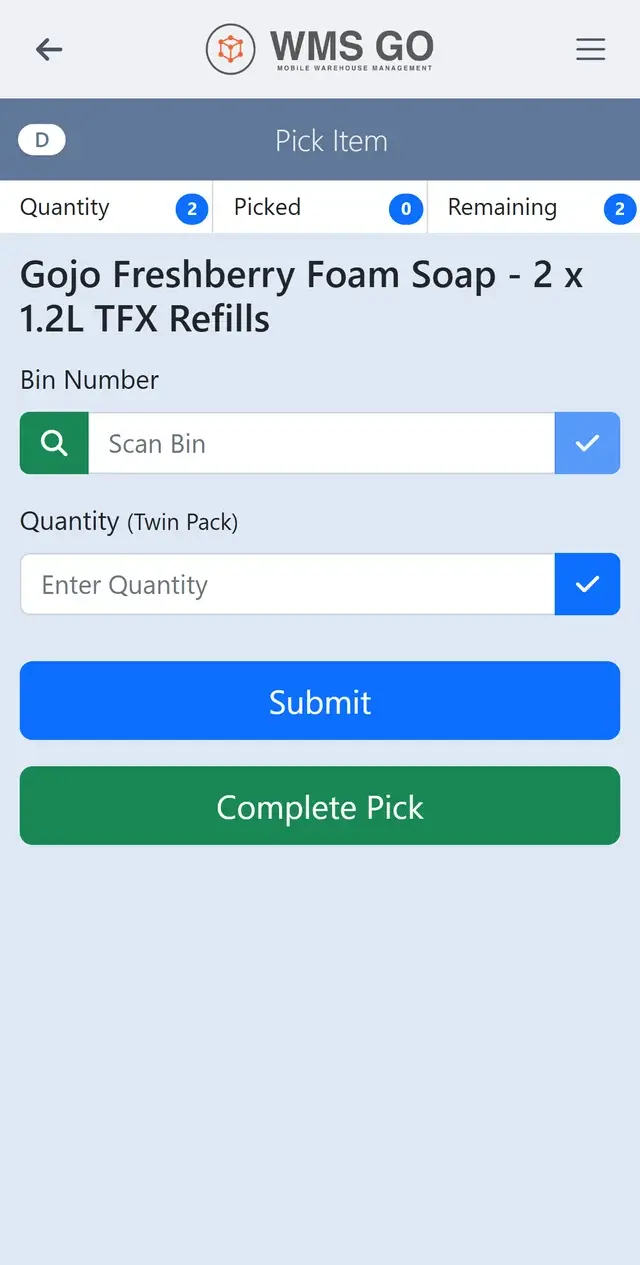
Picking: scan the bin, enter the quantity, complete the pick.
See scan-led picking on your own orders.A 30-minute demo, run on orders like yours.
How does WMS GO handle packing, licence plates and labels?
- Licence platesBoxes, totes and pallets as one container model. Move or re-plate a whole plate in one scan.
- Print DesignerDesign labels from NetSuite data without code: Code 128, QR, or one combined barcode.
- Print routingJobs routed by process and site to network printers, as PDF or ZPL through PrintNode.
- Event printing and historyPrint automatically when things happen, with a full print history.
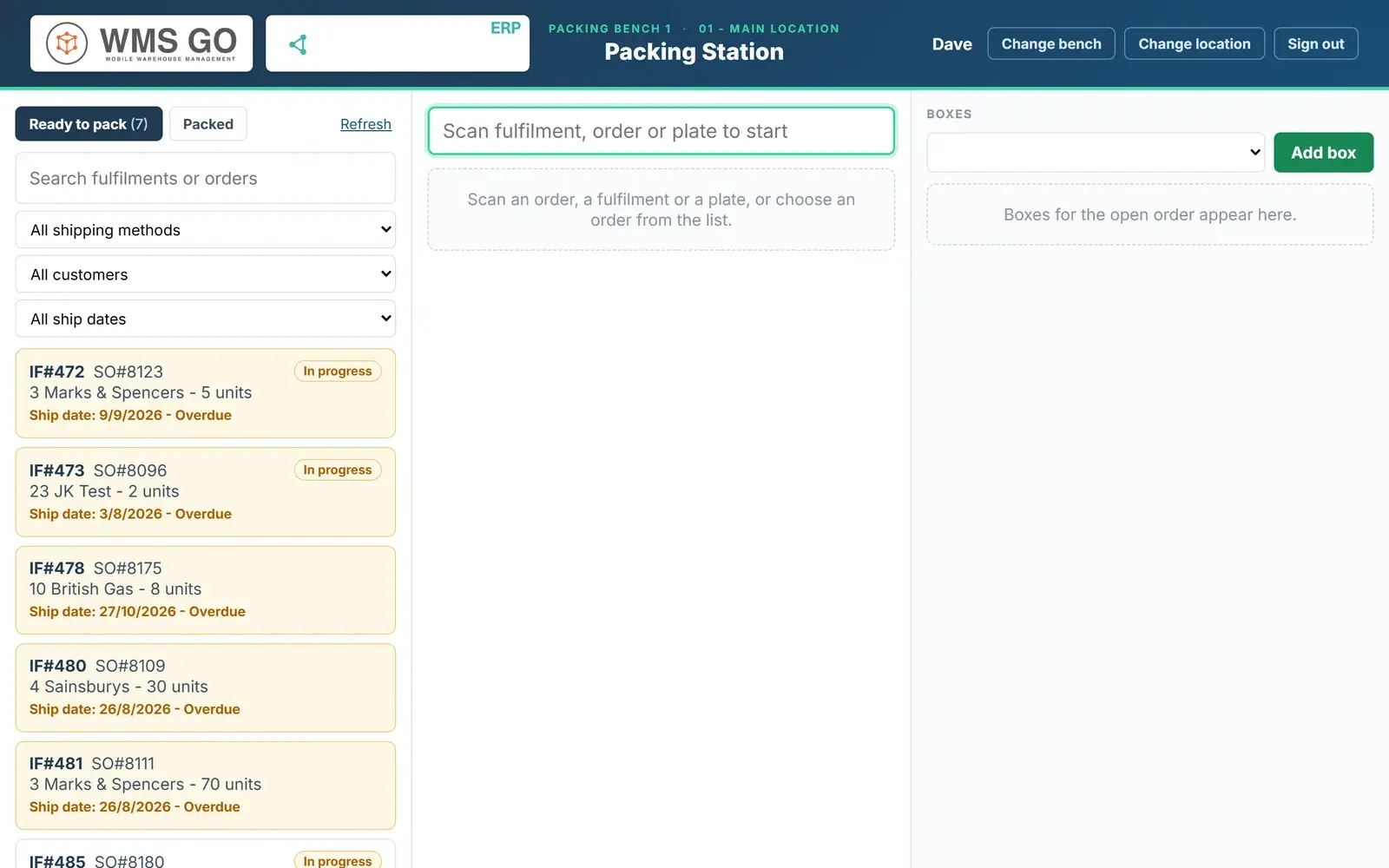
- Packing Station (add-on)Verify every unit and lot, build the boxes, capture weight from a scale and take photos.

How does WMS GO handle stock counts and stock moves?
- Cycle and bin countsCount by bin or item, with variances sent for approval.
- Adjustment requests and approvalsFloor raises it, a manager approves it, NetSuite records it.
- Bin transferMove stock between bins with a scan at each end.
- Inventory transferMove stock between locations.

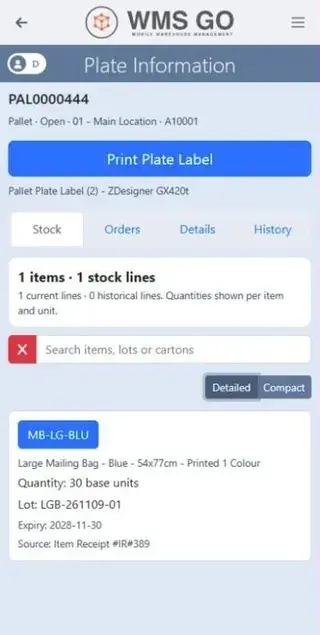
Plate Information: a pallet with its stock, lot and expiry.
What does Item Information show?
Every item's stock on one screen: on hand, available and on order, split by bin and lot.
Each line shows the lot or serial number, expiry date and inventory status, so stock in Quality Control is easy to spot. From the same screen you can trace the item, see where it is used or open it in NetSuite.
What can warehouse managers do in the Manager Hub?
The Manager Hub runs inside NetSuite. Supervisors plan the work, watch it happen and put things right from one desk, with nothing keyed twice.
Dashboards and search
See the whole warehouse at a glance.
- Seven ready-made live dashboards
- Build and share your own
- Click any figure to see the records behind it
- Search any order, item, lot or plate
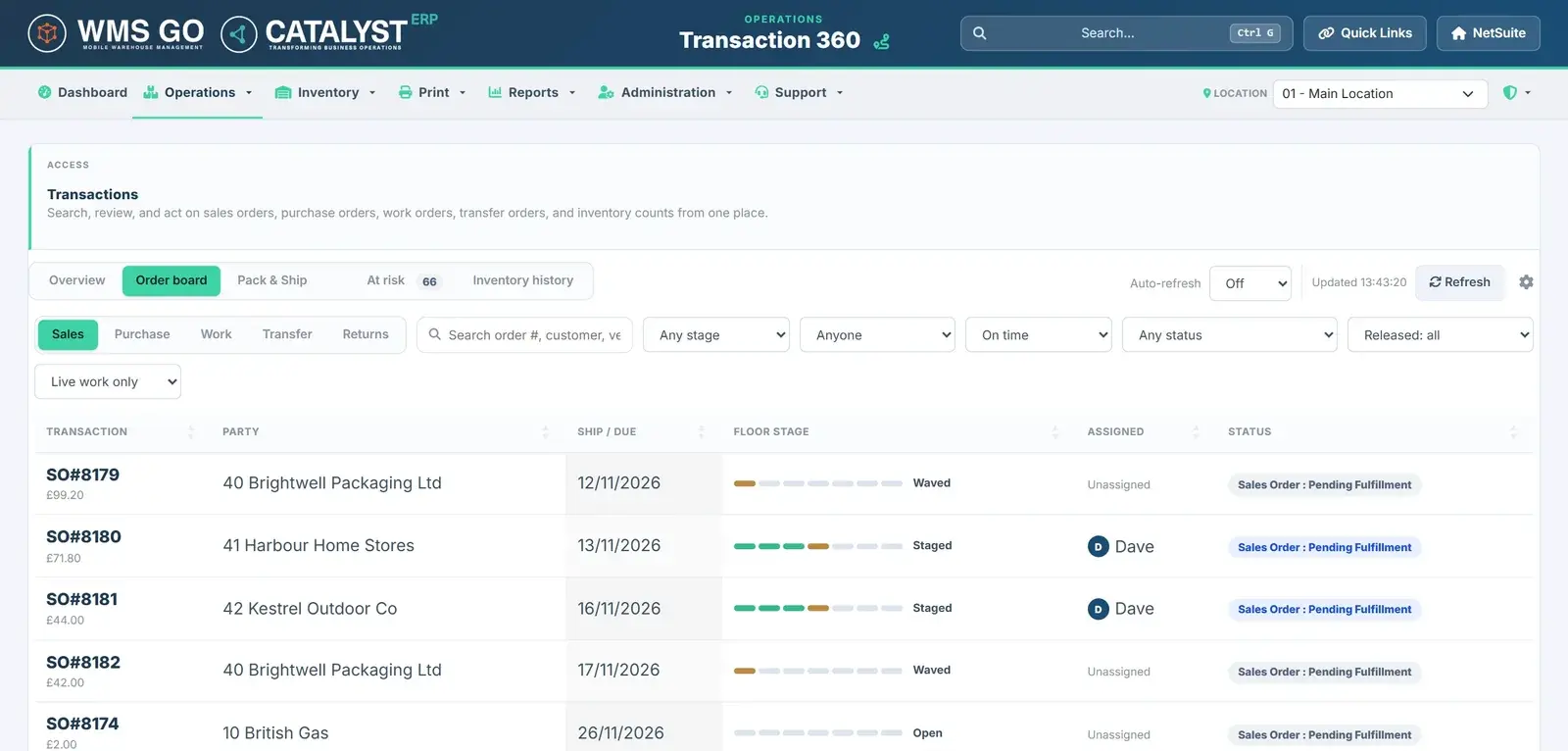
Transaction 360
Every order, its stage and who has it.
- Sales, Purchase, Work, Transfer and Return orders
- The floor journey of each order
- Reassign, release or hand over in place
- Late and at-risk orders flagged
Waves and assignment
Release the right work to the right people.
- Manual waves
- Wave automation by rules, per location
- Pick assignment and handover
- Receipt release between receivers
Order amend and unwind
Change an order after picking has started.
- Ship-to address or shipping method
- Cancel an order or undo its picks
- Reverse a fulfilment, with a reason
- See what will happen before it changes
Lots, expiry and counts
Keep stock and traceability right.
- Lot allocation rules, FEFO or FIFO
- Expiry rules by location
- Stock and cycle counts with approval
- Nightly licence plate re-check
Labels and printing
Design once, print where the work happens.
- Drag-and-drop Print Designer
- PDF and Zebra ZPL output
- Printing automation on floor events
- PrintNode routing and print history
Reports
Answers without writing a query.
- Pivot, chart and Excel export
- Build your own reports
- On time in full and cycle times
- Shrinkage and adjustment trends
People and set-up
Control who can do what.
- Users, warehouse roles and locations
- Audit trail with before and after values
- One Settings screen that lists prerequisites
- Copy set-up from sandbox to production
Manager Hub users need NetSuite access. Some options are switched on in Settings.
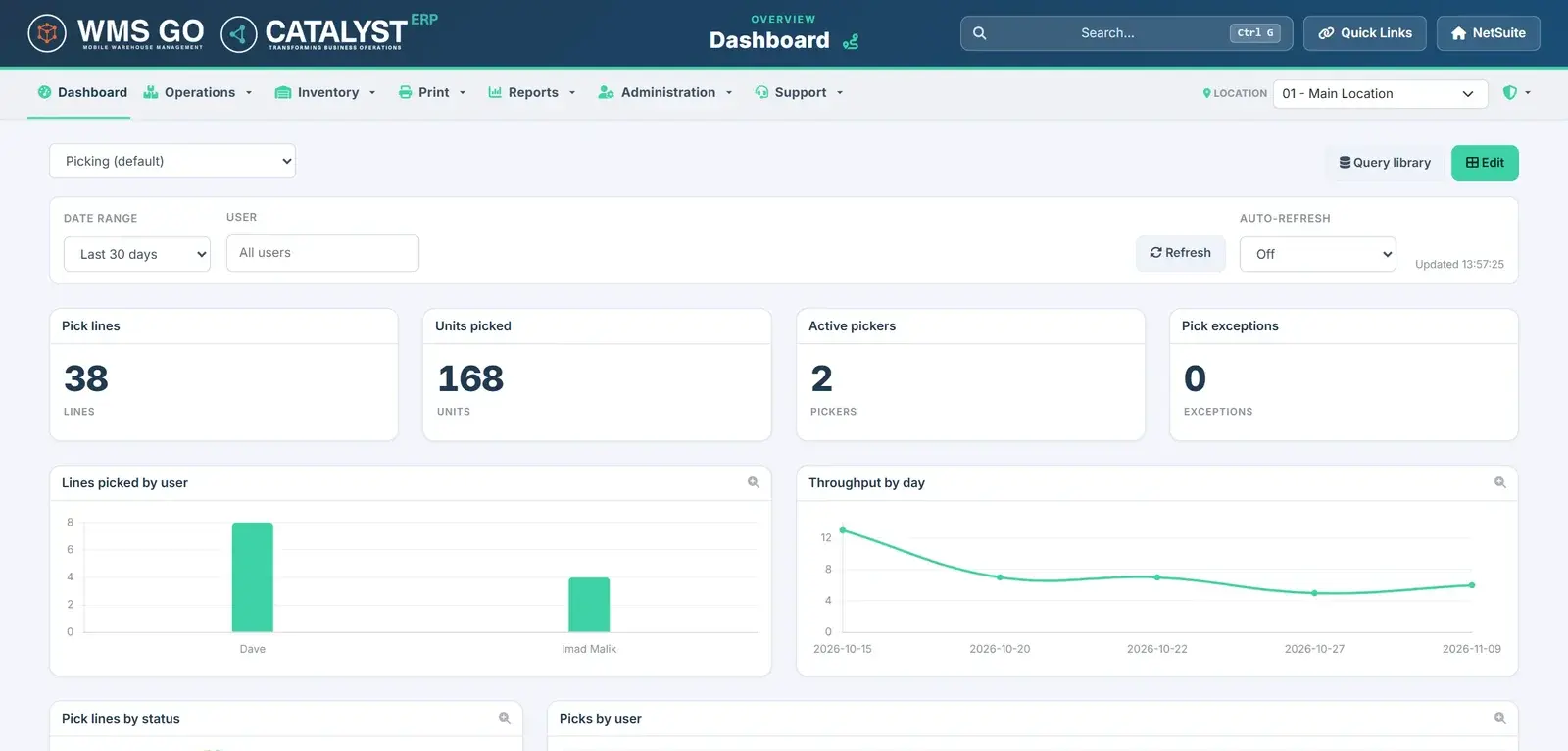
What can supervisors see on the picking dashboard?
How the floor is picking, live: pick lines, units picked, active pickers and pick exceptions.
Charts show lines picked by each user and throughput by day. Filter by date range or user, set it to refresh on its own, and click any figure to see the records behind it.
Want the full list to share with your team?Every feature, its status and what it needs, in one PDF.
Which NetSuite set-ups does WMS GO support?
- Native NetSuite transactionsEvery scan is a real NetSuite transaction. No second database and nothing to sync.
- Multi-subsidiary and multi-locationSign in to the subsidiary and location you are working in.
- Unlimited floor-app usersPickers and packers sign in without a NetSuite licence. Manager Hub users need NetSuite access.
- Installs as a web app on any deviceRuns in the browser on scanners, tablets, phones and PCs, and installs to the home screen or desktop.
- Secure sign-in controlsIdle lock and password policies, designed around 21 CFR Part 11 sign-in requirements.
- Config bundlesMove your set-up from sandbox to production in one go.
- Modular switchesEvery capability has its own switch. Turn it on when you need it.

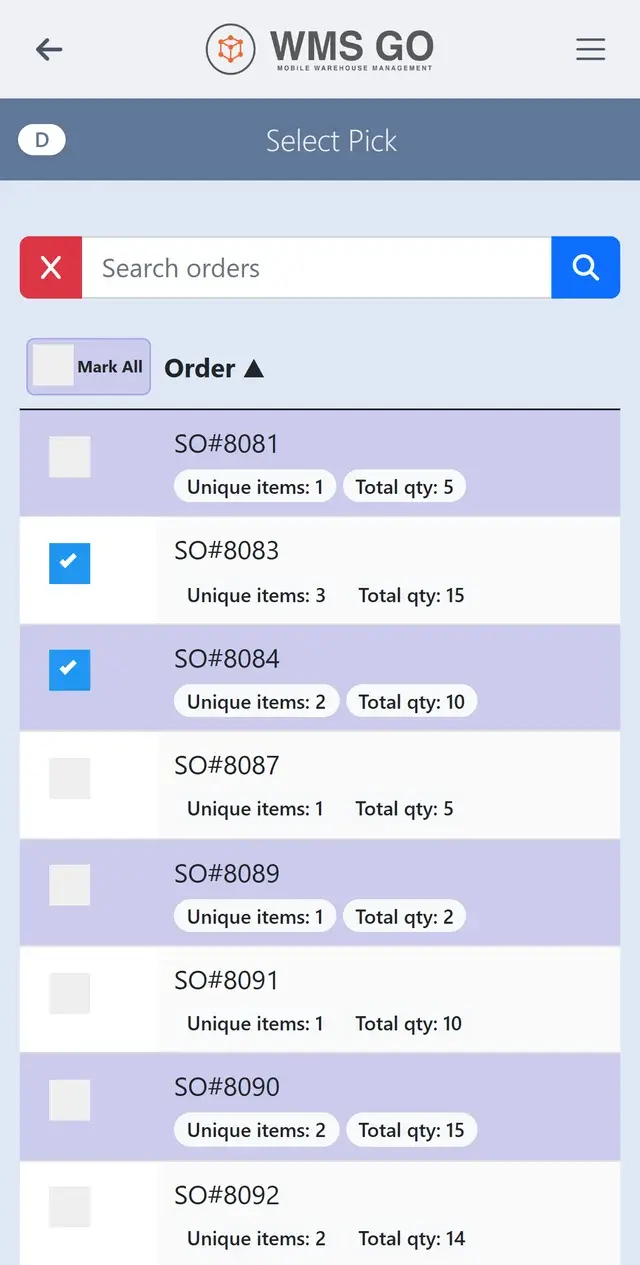
Select Pick: choose the orders to pick together in one walk.
What buyers ask when comparing WMS GO
Does WMS GO work with my existing NetSuite set-up?
Yes. WMS GO runs inside your NetSuite account and posts native NetSuite transactions. One Settings screen lists the prerequisites, and the Catalyst ERP team checks them with you before you start.
Can it support multiple warehouse locations?
Yes. WMS GO supports multiple subsidiaries and locations. Floor users sign in to the one they are working in, and allocation and wave rules can differ by site.
How does it handle stock status and quarantine?
Stock with a quarantined or unavailable inventory status never reaches a pick list, so it cannot be picked by mistake.
Does it support food, drink and other expiry-led stock?
Yes. WMS GO records lot, serial, expiry and operator on every move, allocates lots by FEFO or FIFO with a minimum shelf life, and raises warning and critical expiry alerts.
Can it be set up around our barcode formats?
WMS GO reads GS1 and supplier barcodes, capturing item, lot and expiry in one scan. Lot numbers follow your own format, and labels print as Code 128, QR or one combined barcode.
What devices does WMS GO run on?
Any device with a modern browser: Android handheld scanners, tablets, phones and PCs. Labels print to network printers through PrintNode.
How does implementation work?
Catalyst ERP reviews your requirements, checks NetSuite readiness, configures WMS GO in sandbox, then moves it to production in one go. The one-off implementation fee is £7,500, and it typically takes 7 to 14 days.
What support is available?
Support is available to every WMS GO customer, from Catalyst ERP's in-house team. The same team designs, implements and supports WMS GO.
Does WMS GO work offline?
Not yet. WMS GO needs a connection to NetSuite today. Offline mode is on the roadmap.
Does WMS GO handle Work Orders, Transfer Orders and returns?
Yes. Work Order picking and builds, Transfer Order receipts and customer returns are all live.
See WMS GO on your own orders.
Book a 30-minute demo, or download the full feature list to share with your team.